Scaling With Agents
With Claude Code, you're a CTO now - not an artisanal coder. How I'm breaking down work into agent-friendly chunks and using CI/CD pipelines to unlock infinite parallel compute.


The current generation of Frontier Models are incredibly capable. It is no longer a question of what can I build but how fast can I build it. But building fast at scale introduces its own complexity. Scaling your compute and your Agents is two completely different issues that have to be done in lock step.
Mise en Place
With Claude Code you are now a CTO, if you enjoyed being in the weeds of your codebase and writing artisanal Python like I did you need a whole new set of skills to build at the new scales available to you. Implementation details are now a waste of time, you need to be able to take large projects and break them down into smaller independent features that can be worked on in parallel.
I use GitLab with the glab CLI tool to have Claude help me plan everything out. I find that the interview style works really well for this. It's impossible to one shot explain a perfectly constrained statement of work for Claude to break down so the back and forth is really important. I find myself totally changing my perception of the project as we go through this phase.
It's important to vibe code at this phase too. Sure you probably have some infrastructure constraints like the project needs to run on your macbook, and host in a cloud that you are familiar with but other than that I try to let my Agent figure out those details. Remember you are a CTO you're worried about the vision not that your favorite language is used. Personally I strongly dislike Javascript, but for many projects it is the right tool for the job and a tool that Claude understands incredibly well. When I stopped forcing a stack that I preferred on my Agents things started coming together a lot better. This isn't to say that your technical depth is going to go to waste, it's just that for many large projects you need to think bigger picture.
Now back to breaking down work, I recommend going the whole nine yards and really plan things out. I know most engineers don't even want to use branches for personal projects but having Claude help you make Sprints, Epics, crawl/walk/run plans, etc. goes a super long way. Remember that the biggest issue with Agents is that they are stateless, and the more you cram into their little brains the worse they perform. So, having layers that the Agent can reach out to if it needs more information on its own is really powerful. Most of the time the Merge Request description and the codebase is all it needs, but sometimes a problem isn't well enough defined and it can go out and grab that context itself.
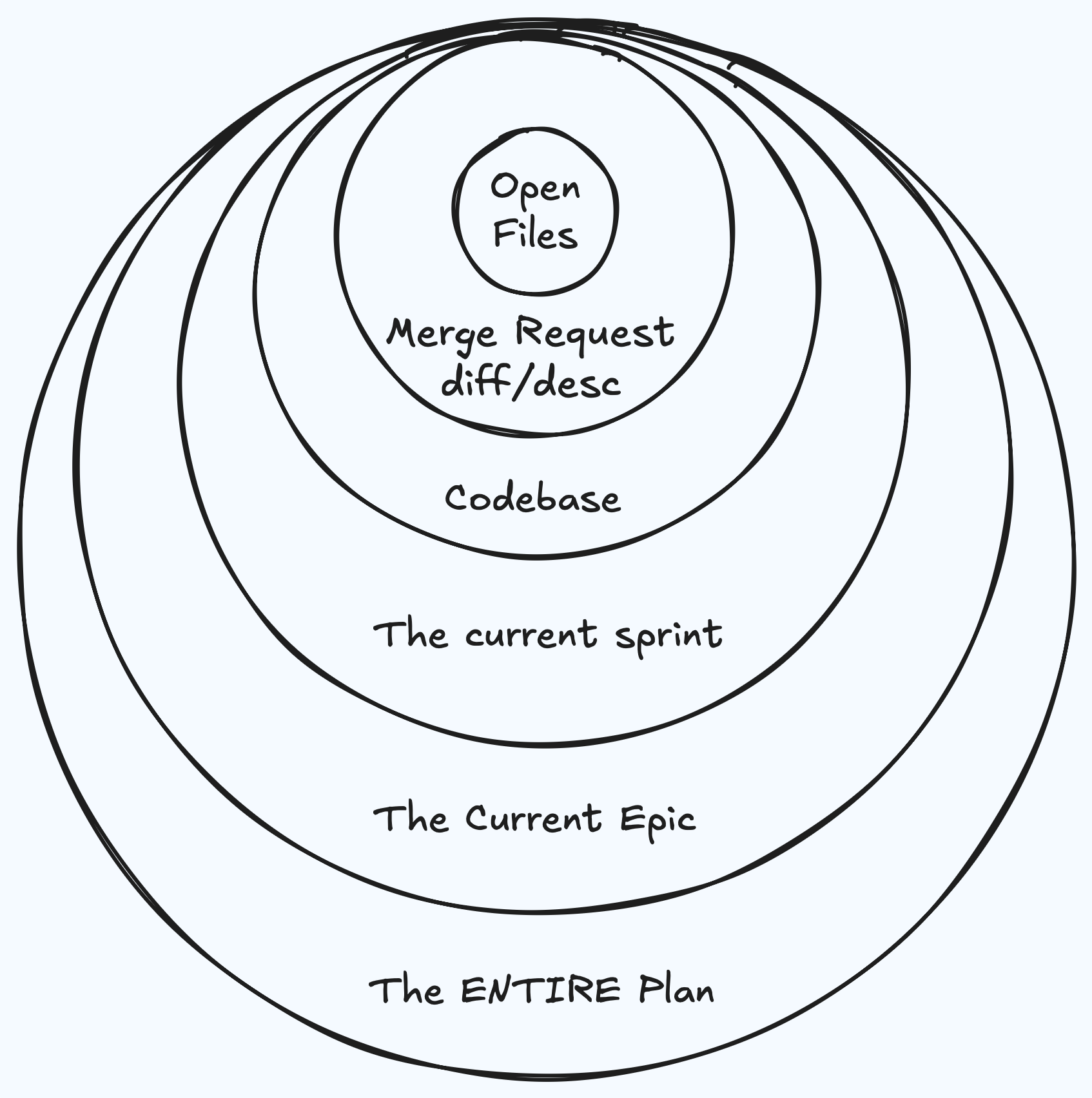
Breaking this work down also helps your orchestration Agent know what needs to be worked on next. If your orchestration Agent needs to understand every single ticket and the entire codebase on every iteration then it is going to fail.
I do still skim all tickets and sprints before I let my Agents get to work, but I rarely make any edits myself. Any issues I see I tell my planning agent directly to make sure that it keeps everything in alignment, and so that it fully understands the bigger picture. One of the most powerful things Claude can do is keep things in alignment. One of my favorite prompts is to tell my Agents to review the ticket, Merge Request description, docs/ and the codebase to make sure that everything is in alignment. Make it use multiple independent Agents and to be exhaustive.
This essentially changes your coding language into English. Your docs/ will be a source of truth that you can review to make sure everything meets your expectations, your open work items describe the path forward. Any divergence you just explain the issue to your Agent it gets fixed.
Infinite Compute
Now, you've broken your project down into a super detailed plan that your Agents can go work through on their own, but you're limited to an old laptop that can barely run your test suite, let alone run it 10 times in sync while all of your Agents are developing at the same time.
Enter CI/CD Pipelines. Pipelines are something I'm kind of obsessed with, every startup I've worked for is confused when the first thing I want to tackle is getting a pipeline set up for running tests and lints. I think the single most important part of any team is aligning on workflows and CI pipelines are a great way to do that. A huge benefit for AI Agents is that it essentially gives each Agent a sandbox so when you have 8 Agents working through an entire 2 week sprint in parallel you don't have to worry about them working on top of each other. Some tools, especially when working simulation environments, can't run multiple times on one machine so even if you are using git worktrees you won't be able to support multiple Agents iterating at once.
The other huge benefit is you get infinite compute. One important thing when working with Agents is your test suite needs to be overkill to ensure that your workflows are protected. Remember AI Agents are stateless beings so it won't know what your code is supposed to look like when you run it, if there isn't a clear pass/fail in your iteration loop your Agents will break everything around them. So, your test suite is 10x larger than it would be if developed by humans, and there are 8 AI Agents working all at the same time on different tasks, so even a beefy development machine is going to struggle under the workloads. A Pipeline fixes this entirely.
Conclusion
Scaling is the latest hot topic, this is how I do it and I've been seeing a ton of success with it. I'm helping multiple startups manage the entirety of their software development with these workflows.
If you are only using one Agent at a time, or babysitting your Agents then you are missing out on massive productivity boosts. Break your problems down into chunks up front, and make sure that you have infrastructure in place to keep your Agents aligned and able to develop entirely independently with no bottlenecks.